
Mobile internet abroad in minutes — no physical SIM card needed
eSIM for Montserrat
eSIM is a virtual SIM card. Buy online, scan QR, internet works just like with a local SIM.
eSIM plans for Montserrat
Choose your eSIM plan
 Montserrat 1 GB 7 daysMontserrat 2 GB 15 daysMontserrat 3 GB 30 daysMontserrat 5 GB 30 daysMontserrat 10 GB 30 daysMontserrat 25 GB 30 daysMontserrat 50 GB 30 days
How it works?
Choose a plan
Country, data volume and validity period
Pay for order
By card — fast and secure
Get your eSIM
QR code on screen and email confirmation
Install on phone
Scan QR or tap the install link
Activate on arrival
Turn on eSIM in destination country to get data
Choose a plan
Country, data volume and validity period
Pay for order
By card — fast and secure
Get your eSIM
QR code on screen and email confirmation
Install on phone
Scan QR or tap the install link
Activate on arrival
Turn on eSIM in destination country to get data
Travel stats for Montserrat
Reference indicators for eSIM demand and usage in this country.
Data usage calculator for Montserrat
Estimate your required volume and pick a suitable plan for your usage.
Recommended plans
Montserrat 5 GB 30 daysMontserrat 10 GB 30 daysMontserrat 25 GB 30 daysComparison with alternatives
| Roaming | Local SIM(Digicel Montserrat, Vodafone) | SimForTrip eSIM for Montserrat | |
|---|---|---|---|
| Price per day | ~$6 | ~$1 | ~$1 |
| Connection | Automatic | Find a store | Instant |
| Document required | Not required | Passport | Not required |
| Works when | Immediately | After 1-2 hours | Immediately |
✓ 6x cheaper than carrier roaming
Internet in Montserrat: Brades
Where travelers usually need data in Montserrat
- Airport and transfer: maps, messengers, and taxi apps right after landing.
- Brades: navigation, bookings, banking apps, and daily connectivity.
- Brades: data for routes, taxi apps, and local services.
- Brades: connection quality can vary based on distance and network load.
- Remote areas: connection quality may vary based on coverage.
How to choose a package for Montserrat
- Short trip: a basic package is often enough for maps, chats, and taxi apps.
- 7-10 day vacation: choose a medium package for navigation, social apps, and video.
- Long itinerary: pick a package with data headroom and top-up option.
Device Compatibility
Does your phone support eSIM?
Dial *#06#: if EID appears, your device supports eSIM.
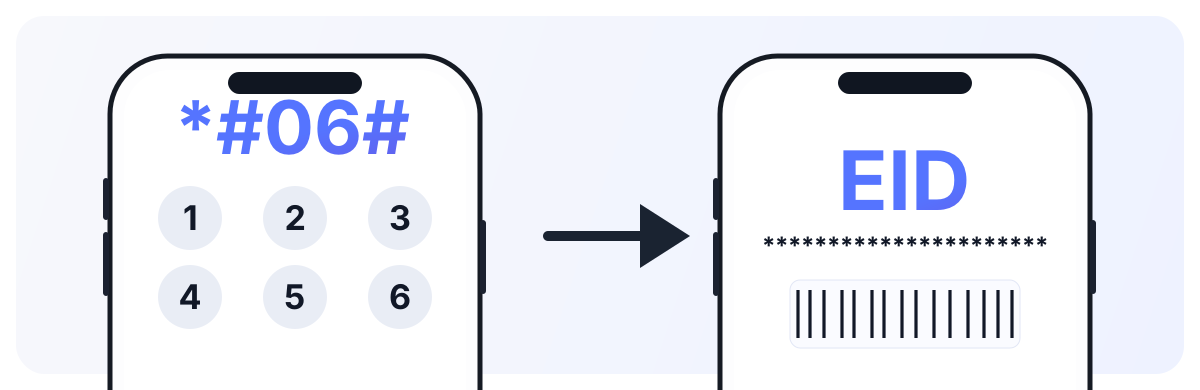
For iPhone, also verify there are no SIM restrictions: Settings → General → About → Carrier Lock (it should say “No SIM restrictions”).
Installation Guide
Select your platform and installation method
Open Settings → Cellular → Add eSIM
Select 'Use QR Code' and scan the QR from email
Confirm adding the cellular plan
Choose a label for eSIM (e.g., 'Travel')
On arrival: enable eSIM in cellular settings and turn on data roaming for it
Tip: Install eSIM at home over Wi-Fi. On arrival in another country, just enable it in settings and don't forget to turn on data roaming for it.
Connectivity reviews in Montserrat
“Brades, 5 days. Internet activated quickly, maps and messengers stayed stable in Brades.”
— Alex
“Brades, 7 days. Used it for navigation, bookings, and work chats. In Brades, it covered daily travel needs reliably.”
— Emma
“Brades, 10 days. Convenient setup before departure and no need to buy a physical SIM on arrival. Connection remained usable around Brades.”
— Liam
Guarantees
Money back
If eSIM doesn't work — we refund
Secure payment
Payments via T-Bank with data protection
24/7 Support
We respond on Telegram and email
Money back
If eSIM doesn't work — we refund
Secure payment
Payments via T-Bank with data protection
24/7 Support
We respond on Telegram and email
Montserrat eSIM FAQ
Montserrat eSIM guide for reliable mobile data
Show detailed guide
Popular travel areas
- Brades: city routes, navigation, bookings, and everyday connectivity.
- Brades: data for taxi apps, maps, and messaging.
- Brades: remote areas may have lower speed than central locations.
Coverage and operators
- Commonly available networks: Digicel Montserrat, Vodafone.
- Coverage is usually stronger in major cities and tourist zones.
- Intercity and remote routes can show variable throughput.
Setup checklist
- Choose a package by trip duration and expected data usage.
- Install the eSIM profile via QR code or install link.
- Enable mobile data, set eSIM as your data line, and turn on data roaming for eSIM.
Montserrat eSIM gives quick setup and predictable connectivity without buying a physical SIM card on arrival.
 Morocco
 Mozambique
 Nepal
Nepal Netherlands
 New Caledonia
 New Zealand
 Nicaragua
 Niger
Niger Türkiye
 United Arab Emirates
 Thailand
 Russian Federation
 Egypt
Egypt Georgia
 China
China Maldives
 Sri Lanka
 Kazakhstan
 Serbia
 Vietnam
 Indonesia