
Mobile internet abroad in minutes — no physical SIM card needed
eSIM for Holy See (Vatican City State)
eSIM is a virtual SIM card. Buy online, scan QR, internet works just like with a local SIM.
eSIM plans for Holy See (Vatican City State)
Choose your eSIM plan
 Holy See (Vatican City State) 1 GB 3 daysHoly See (Vatican City State) 3 GB 30 daysHoly See (Vatican City State) 5 GB 30 daysHoly See (Vatican City State) 10 GB 30 daysHoly See (Vatican City State) 20 GB 30 daysHoly See (Vatican City State) 20 GB 31 daysHoly See (Vatican City State) 50 GB 30 daysHoly See (Vatican City State) 50 GB 31 daysHoly See (Vatican City State) 50 GB 90 daysHoly See (Vatican City State) 100 GB 31 days
How it works?
Choose a plan
Country, data volume and validity period
Pay for order
By card — fast and secure
Get your eSIM
QR code on screen and email confirmation
Install on phone
Scan QR or tap the install link
Activate on arrival
Turn on eSIM in destination country to get data
Choose a plan
Country, data volume and validity period
Pay for order
By card — fast and secure
Get your eSIM
QR code on screen and email confirmation
Install on phone
Scan QR or tap the install link
Activate on arrival
Turn on eSIM in destination country to get data
Travel stats for Holy See (Vatican City State)
Reference indicators for eSIM demand and usage in this country.
Data usage calculator for Holy See (Vatican City State)
Estimate your required volume and pick a suitable plan for your usage.
Recommended plans
Holy See (Vatican City State) 5 GB 30 daysHoly See (Vatican City State) 10 GB 30 daysHoly See (Vatican City State) 20 GB 30 daysComparison with alternatives
| Roaming | Local SIM(Iliad, TIM, TIM maritime, Wind, Orange, ILIAD Italia S.p.A., Vodafone Italy (Swisscom), WINDTRE) | SimForTrip eSIM for Holy See (Vatican City State) | |
|---|---|---|---|
| Price per day | ~$6 | ~$1 | ~$1 |
| Connection | Automatic | Find a store | Instant |
| Document required | Not required | Passport | Not required |
| Works when | Immediately | After 1-2 hours | Immediately |
✓ 6x cheaper than carrier roaming
Internet in Holy See (Vatican City State): Vatican City
Where travelers usually need data in Holy See (Vatican City State)
- Airport and transfer: maps, messengers, and taxi apps right after landing.
- Vatican City: navigation, bookings, banking apps, and daily connectivity.
- Vatican City: data for routes, taxi apps, and local services.
- Vatican City: connection quality can vary based on distance and network load.
- Remote areas: connection quality may vary based on coverage.
How to choose a package for Holy See (Vatican City State)
- Short trip: a basic package is often enough for maps, chats, and taxi apps.
- 7-10 day vacation: choose a medium package for navigation, social apps, and video.
- Long itinerary: pick a package with data headroom and top-up option.
Device Compatibility
Does your phone support eSIM?
Dial *#06#: if EID appears, your device supports eSIM.
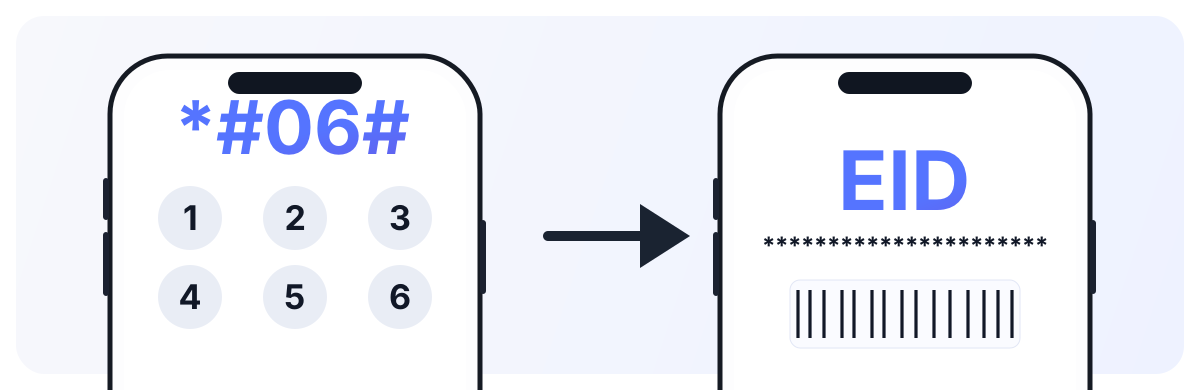
For iPhone, also verify there are no SIM restrictions: Settings → General → About → Carrier Lock (it should say “No SIM restrictions”).
Installation Guide
Select your platform and installation method
Open Settings → Cellular → Add eSIM
Select 'Use QR Code' and scan the QR from email
Confirm adding the cellular plan
Choose a label for eSIM (e.g., 'Travel')
On arrival: enable eSIM in cellular settings and turn on data roaming for it
Tip: Install eSIM at home over Wi-Fi. On arrival in another country, just enable it in settings and don't forget to turn on data roaming for it.
Connectivity reviews in Holy See (Vatican City State)
“Vatican City, 5 days. Internet activated quickly, maps and messengers stayed stable in Vatican City.”
— Alex
“Vatican City, 7 days. Used it for navigation, bookings, and work chats. In Vatican City, it covered daily travel needs reliably.”
— Emma
“Vatican City, 10 days. Convenient setup before departure and no need to buy a physical SIM on arrival. Connection remained usable around Vatican City.”
— Liam
Guarantees
Money back
If eSIM doesn't work — we refund
Secure payment
Payments via T-Bank with data protection
24/7 Support
We respond on Telegram and email
Money back
If eSIM doesn't work — we refund
Secure payment
Payments via T-Bank with data protection
24/7 Support
We respond on Telegram and email
Holy See (Vatican City State) eSIM FAQ
Holy See (Vatican City State) eSIM guide for reliable mobile data
Show detailed guide
Popular travel areas
- Vatican City: city routes, navigation, bookings, and everyday connectivity.
- Vatican City: data for taxi apps, maps, and messaging.
- Vatican City: remote areas may have lower speed than central locations.
Coverage and operators
- Commonly available networks: Iliad, TIM, TIM maritime, Wind, Orange, ILIAD Italia S.p.A., Vodafone Italy (Swisscom), WINDTRE.
- Coverage is usually stronger in major cities and tourist zones.
- Intercity and remote routes can show variable throughput.
Setup checklist
- Choose a package by trip duration and expected data usage.
- Install the eSIM profile via QR code or install link.
- Enable mobile data, set eSIM as your data line, and turn on data roaming for eSIM.
Holy See (Vatican City State) eSIM gives quick setup and predictable connectivity without buying a physical SIM card on arrival.
 Honduras
 Hong Kong
 Hungary
 Iceland
 India
India Indonesia
 Iraq
Iraq Ireland
 Türkiye
 United Arab Emirates
 Thailand
 Russian Federation
 Egypt
Egypt Georgia
 China
China Maldives
 Sri Lanka
 Kazakhstan
 Serbia
 Vietnam